
Meeting room
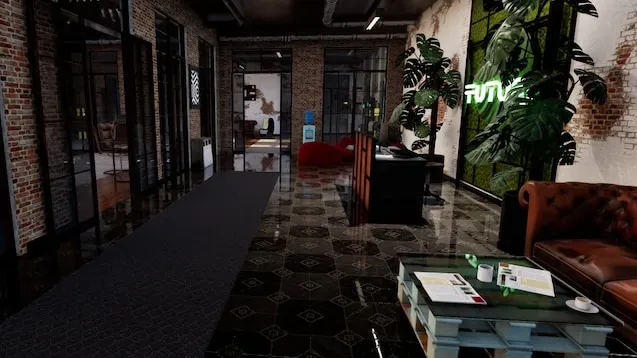
A realistic office packed with furniture, props, and hiding spots for all group sizes.
Recommendation:Recommended
The most balanced Workshop map right now. Works for any group size and any mode.
Subscribe on SteamQuick Facts
Lobby Size
4-6 players
Difficulty
Medium
Map Size
Medium
Visual Style
Moderate
Beginner
Better after a warm-up round
Who Should Play This Map
Balanced: hiders have props to use but seekers can learn the room layout in one round.
What Players Say
What players like
Players praise the photorealistic art style and the sheer number of props scattered through every room. Foosball tables, sofas, paintings, and office furniture create unpredictable hiding moments that keep friend-lobby rounds fresh.
What players complain about
The main complaint is that visual detail works both ways: new seekers can feel overwhelmed by the noise, and hiders sometimes blend so well that rounds drag without Infection mode.
Should you try it?
Try it as your first Workshop map. It works for any group and any skill mix.
How to Play This Map
Hiding Tip
Use office props like sofas and paintings. Don't just blend into a wall — seekers check walls first.
Seeker Tip
Sweep the cafeteria and reception area first. They have the most props and the most hiders.
Common Failure
Blending into a plain wall in a room full of interesting props makes you the only flat surface a seeker notices.
Known Issues
No repeated public issue found in the sources checked so far.
Subscribe and Play
- Open the map on Steam Workshop. Click here to open Meeting room on Steam.
- Click the green Subscribe button. Steam will automatically download the map in the background.
- Launch Meccha Chameleon. Create a server and open the map settings. Your subscribed map should appear in the picker.
Map not showing?
- Make sure Steam finished downloading the map.
- Restart Steam and relaunch the game.
- Make sure your game is updated to the latest version.
- See the full troubleshooting checklist.
Related Maps
Maps with similar lobby size or style.
Minecraft
Blocky village with diamond ore, village houses, and pixelated textures that make hiding easy.
4-6 players · Easy
ART GALLERY
Hide inside famous paintings. ~50 artworks, small rooms, and a clever anti-pixel-check mechanic.
4-6 players · Hard
The Market
Dense marketplace with houses, sheds, storefronts, produce stands, and narrow paths.
6-10 players · Medium