
The Village
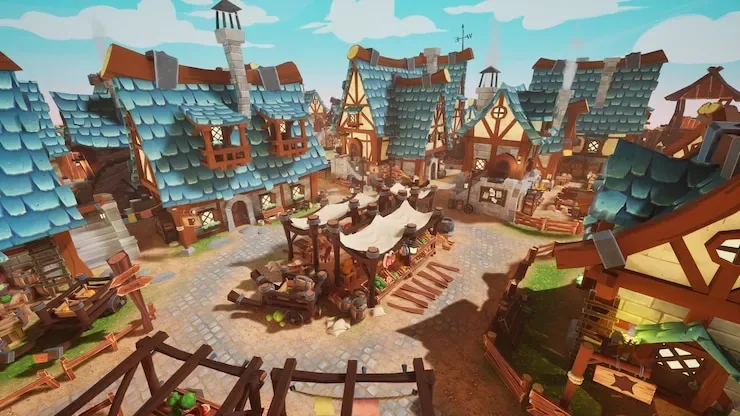
Fantasy medieval village with houses, roads, and props spread across a wide area.
Recommendation:Check first
Great for large groups with Infection mode, but can drag for solo hunters without adjustments.
Subscribe on SteamQuick Facts
Lobby Size
6-10 players
Difficulty
Medium
Map Size
Large
Visual Style
Moderate
Beginner
Better after a warm-up round
Who Should Play This Map
Large map favors hiders. Use Infection mode and 2+ hunters to keep rounds moving.
What Players Say
What players like
Excellent balance of visibility and detail. Bright cartoon colors help hiders blend without needing perfect texture matching. Considered one of the best-looking Workshop maps.
What players complain about
Without adjustments, matches can drag for a solo hunter. The large area means seekers need extra time or Infection mode. First-time players can get lost.
Should you try it?
Try it with 6+ players and Infection mode. Skip for small groups or single-hunter rounds.
How to Play This Map
Hiding Tip
Use the medieval props: barrels, market stalls, and house corners. The cartoon style forgives rough color matching.
Seeker Tip
Focus on the market area first. Houses are secondary — most hiders pick props over buildings.
Common Failure
Hiding in a remote house corner. Seekers check buildings last, but when they do, isolated hiders have no escape.
Known Issues
No repeated public issue found in the sources checked so far.
Subscribe and Play
- Open the map on Steam Workshop. Click here to open The Village on Steam.
- Click the green Subscribe button. Steam will automatically download the map in the background.
- Launch Meccha Chameleon. Create a server and open the map settings. Your subscribed map should appear in the picker.
Map not showing?
- Make sure Steam finished downloading the map.
- Restart Steam and relaunch the game.
- Make sure your game is updated to the latest version.
- See the full troubleshooting checklist.
Related Maps
Maps with similar lobby size or style.
Meeting room
A realistic office packed with furniture, props, and hiding spots for all group sizes.
4-6 players · Medium
The Market
Dense marketplace with houses, sheds, storefronts, produce stands, and narrow paths.
6-10 players · Medium
Police Station
Classic 90s police department with reception, offices, lockers, and computers.
4-6 players · Medium