
Minecraft
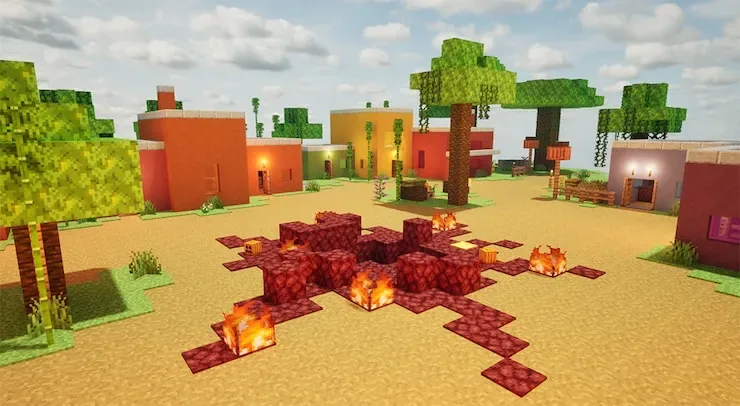
Blocky village with diamond ore, village houses, and pixelated textures that make hiding easy.
Recommendation:Recommended
The most popular Workshop map for a reason. Perfect for beginners and casual sessions with friends.
Subscribe on SteamQuick Facts
Lobby Size
4-6 players
Difficulty
Easy
Map Size
Medium
Visual Style
Moderate
Beginner
Beginner friendly
Who Should Play This Map
Hider-friendly: pixelated textures mean less painting detail needed, but skilled seekers can still spot body outlines.
What Players Say
What players like
Pixelated textures mean you don't need to spend much time detailing your body. The colorful block design creates plenty of hiding spots, and Minecraft fans immediately connect with the theme. One reviewer hid as a crafting table undetected.
What players complain about
Skybox issues let hiders hide on treetops, which can feel unfair. The high/low texture mix makes it tough for new seekers. The map can feel too easy for hiders once they learn the pixel-matching trick.
Should you try it?
Try it as your first Workshop map, especially if your group has new players or Minecraft fans.
How to Play This Map
Hiding Tip
Match the wood or stone textures. Pixelated surfaces mean you need less detail — a simple block color often works.
Seeker Tip
Check treetops and high surfaces. Hiders exploit the skybox gap.
Common Failure
Standing in an open area even with good coloring. Blocky maps still expose body shapes.
Known Issues
Skybox issues allow hiding on treetops
Source: DualShockers review
Subscribe and Play
- Open the map on Steam Workshop. Click here to open Minecraft on Steam.
- Click the green Subscribe button. Steam will automatically download the map in the background.
- Launch Meccha Chameleon. Create a server and open the map settings. Your subscribed map should appear in the picker.
Map not showing?
- Make sure Steam finished downloading the map.
- Restart Steam and relaunch the game.
- Make sure your game is updated to the latest version.
- See the full troubleshooting checklist.
Related Maps
Maps with similar lobby size or style.
ART GALLERY
Hide inside famous paintings. ~50 artworks, small rooms, and a clever anti-pixel-check mechanic.
4-6 players · Hard
Meeting room
A realistic office packed with furniture, props, and hiding spots for all group sizes.
4-6 players · Medium
Swimming pool!
Compact indoor pool area with painted artwork on walls. Best for small groups.
2-4 players · Easy